The "buy a Cricut" step is finally done, and now there's one question on your mind: "Okay, I've got the tool. But what kind of project should I actually make with this cutting machine?"
Because the truth is, the machine doesn't do the work for you (and thank goodness, otherwise we could kiss our imagination goodbye).
With any cutting machine (because yes, we always talk about the Cricut, but there are tons of cutting machine brands, like Silhouette or Loklik), the Cricut materials you choose will determine everything:
- the final result
- how well it holds up over time
- the perceived quality
- and above all... whether your product will sell or not
And nobody tells you this clearly when you're starting out. Everyone talks about creativity, design, files...
But never about what really separates an amateur-looking result from a product that sells: the quality of the material you use to personalize it.
That's exactly why, in this article, I'm going to show you which Cricut materials to use, which ones are the most profitable, and how to avoid the mistakes that waste your time (and more importantly, your money)!
Spoiler alert: if you want fast, clean results, you'll quickly see why heat transfer vinyl and adhesive vinyl are MUST-HAVES!
1. Understanding Cricut Materials
In the beginning, we all think the same thing: that all Cricut materials are created equal. But that's actually... a big mistake!
Because every material obviously has its own uses, its own limitations, and above all... its own profit potential.
And if you choose the wrong one, you could struggle with cutting, botch your transfer, end up with a cheap-looking result, or worse... have a product that won't sell, UN-SELL-ABLE! To explain all this as clearly as I can, we'll go over everything you need to know to make a quality personalized product!
The Main Categories of Cricut Materials
To stay on top of things and become a future Cricut pro, there actually isn't much you need to remember:
1. Heat-applied materials (heat transfer vinyl)
→ these are here to dress up all your fabric items (T-shirts, tote bags, sweatshirts...)
2. Adhesive materials (adhesive vinyl)
→ these are made for hard surfaces (glass, wood, plastic...)
3. "Creative" materials
→ paper, cardstock, faux leather, balsa wood... (these materials are more expensive)
If your goal is to make products to sell, you should focus on these first:
Um, okay, but why? Well, simply because these are the materials that are:
- the easiest to master
- the most in demand on the market
- and the quickest to use for making quality products
And that's exactly what you need if you want to work quickly and efficiently (everything you need for a profitable business)!
What We Often Forget...
You can have the best design and the best idea, but if you pick the wrong material from the start, your product won't make the cut, and that's a disaster!
It's like trying to sell a piece of luxury jewelry... with a cheap finish. People notice right away.
At Transfer Paper, we guarantee the quality of our materials, and they've already been approved by thousands of creators. Easy to use and affordable, they'll be your best allies for your first projects!
2. Heat Transfer Vinyl: The Most Profitable Material There Is
If I had to recommend just one Cricut material to start selling your projects quickly... it would be this one.
Heat transfer vinyl is exactly the kind of product that's easy to use, quick to produce, and above all, has a **high perceived value.
**
And that's exactly what you're looking for when you want to turn a creation into a profitable product.
Why Heat Transfer Vinyl Is a Gold Mine
Fabric items sell all year round. Tote bags, T-shirts, sweatshirts, pouches...
They're useful products that can be customized endlessly and easily adapted to any niche (moms, kids, businesses, events...)
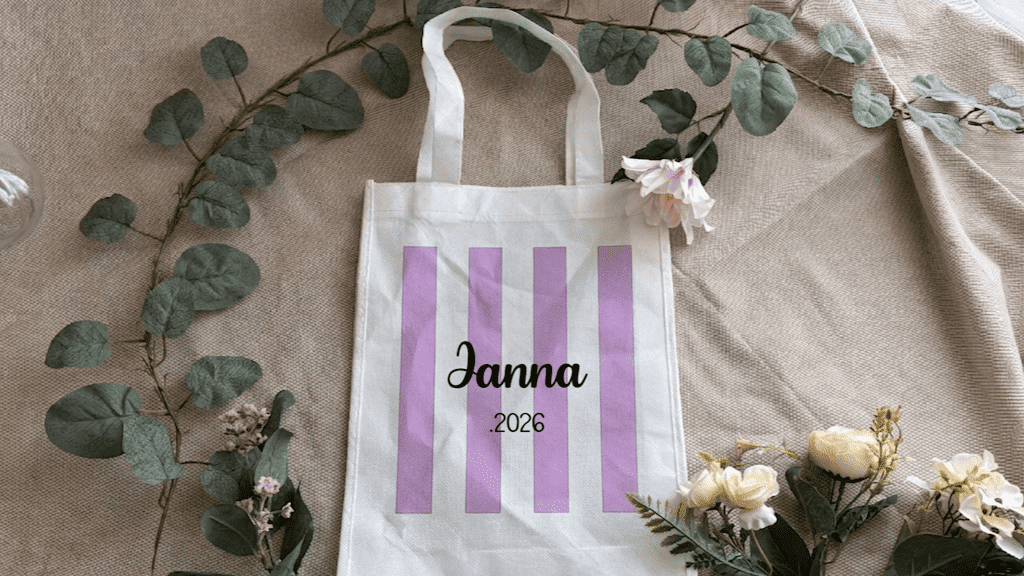
Mini Tutorial: Personalize a Tote Bag with Heat Transfer Vinyl
No need for complicated equipment. All you need is your design idea and a few tools, which I've listed below!
Supplies:
- Heat transfer vinyl, so have fun with the colors and textures
- Cutting machine
- Cotton tote bag
- Heat press
- Weeding kit
Steps:
1. Create your design
Choose a simple text and/or graphic that speaks to you, but above all, one that speaks to your target audience (e.g., a first name, a trendy phrase, a funny message...)
A little tip from Alyah: a simple product is easier to make and sells better than a cluttered one :) . Of course, feel free to create products that suit your own taste!
Simple = effective = sells well.
2. Cut the vinyl
Place the heat transfer vinyl shiny side down on the mat (heat transfer vinyl is always cut from the back!).
Don't forget to mirror your design (it's a classic beginner mistake, so let's avoid it and not ruin our very first cut!). You'll find this option when you're ready to start cutting.
3. Weed
Weeding is when you remove the unwanted parts of the heat transfer vinyl, keeping only what will be transferred. Be careful not to rush and remove parts that were actually supposed to be transferred (yes, yes, I'm speaking from experience here!).
4. Press
Position your design on the fabric, taking the time to place it exactly right. Careful, this step is really super important!
Once your design is in the right spot, press it with your heat press, but don't forget to add your Teflon sheet for protection. As a general rule, heat your press to around 150 to 160°C for 10 to 15 seconds, depending on the heat transfer vinyl. At Transfer Paper, the advantage is that this info is always available on the website!
Once pressing is done, you can remove the plastic carrier sheet. Heads up: some heat transfer vinyls are hot peel and others are cold peel, depending on the brand (meaning you need to remove the carrier sheet at the right temperature).
5. Result
A clean, crisp, professional result. And above all... ready to sell. So, what do you think?
Heat transfer vinyl isn't just a material. With glitter HTV, velvet HTV, or even premium-quality HTV, you can create a real product line. And at that point, you're no longer just making "creations"... you're building a shop that sells!
So, ready for the next step?
3. Adhesive Vinyl: Fast, Efficient, Addictive
If heat transfer vinyl is the king of fabric...
Adhesive vinyl is the king of fast production.
No press, no heat, no hassle. You cut, you stick... and you're done. Yes, yes, it really is that quick and easy!
Adhesive vinyl lets you personalize:
- glasses
- jars
- boxes
- wood
- plastic
- decorative items
and tons of other things!
Put simply: if it has a smooth surface, you can stick your adhesive vinyl design on it.
And best of all... you can produce much faster than with fabric (the heating step for heat transfer vinyl takes a fair amount of time, even if the result is WOW).
So if your goal is to save time, make more products, and test lots of ideas, adhesive vinyl is definitely your best ally.
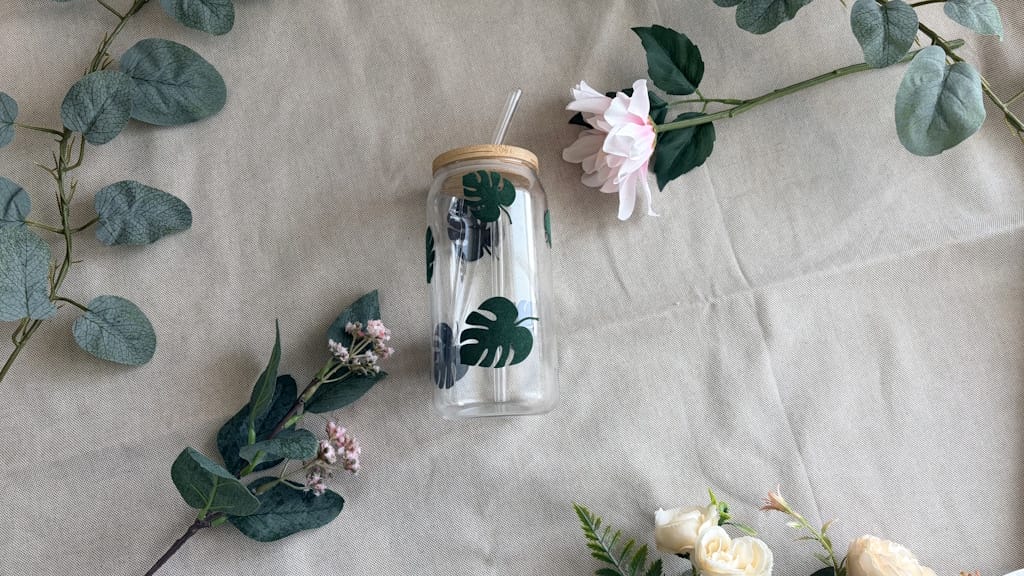
Mini Tutorial: Personalize a Jar with Adhesive Vinyl
Simple, quick, efficient. Perfect for selling.
Supplies:
- Adhesive vinyl
- Cricut machine (or any other cutting machine)
- Glass jar
- Transfer tape (also called transfer film)
Steps:
1. Create your design
Go for:
- short words
- first names
- easy-to-read fonts
Examples: "Sugar," "Coffee," "Mom," "Spices"
2. Cut the vinyl
Place your adhesive vinyl on the mat as is (no need to mirror adhesive vinyl, since it's cut from the front) and start cutting.
3. Weed
Remove the excess vinyl with your weeding tools,
keeping only your text or design.
4. Apply with transfer tape
Place the transfer tape over your design and remove the plastic backing from underneath. Apply your design to the jar. Smooth it down well with your squeegee (press firmly so it sticks). Gently peel off the transfer tape.
5. Result
A clean, modern look, ready to use... or sell!
You can be proud of your result! But don't forget: choosing cheap vinyl means struggling with bubbles and peeling, or even just trying to cut out your designs! So go for quality at a low price with the adhesive vinyl from Transfer Paper!
Alright, here are a few extra tips for a flawless result on every project:
Not cleaning the surface properly before applying your design = it won't stay put (grrrrrr, so frustrating!)
A design that's too thin is a pain to apply and even to weed.
But above all: trying to go too fast without being precise! It's better to take your time and nail your DIY project than to rush and totally ruin your creation!
Vinyl is fast... but it takes careful, clean work!
Now that you've mastered these two materials, let's go over the mistakes to avoid :) .
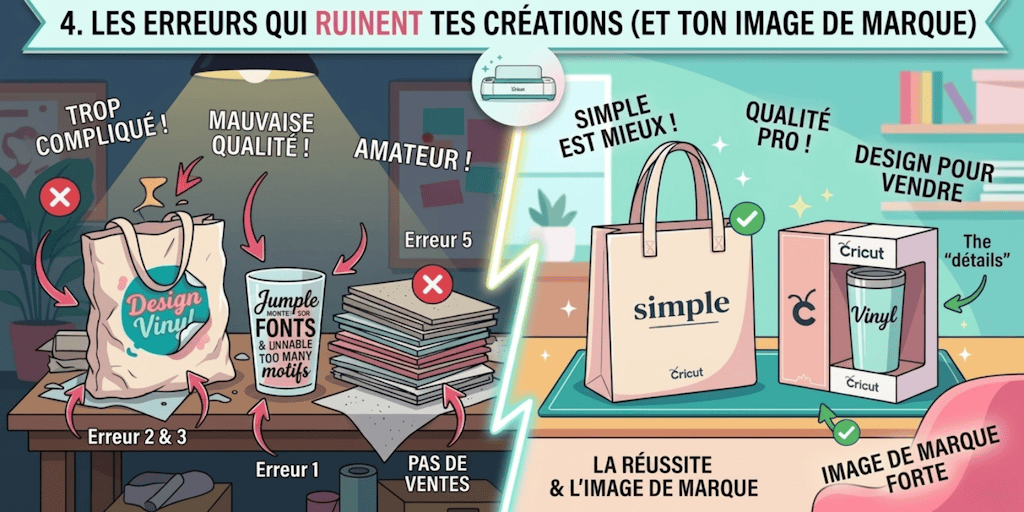
4. The Mistakes That Ruin Your Creations (and Your Brand Image)
You can have:
- a good machine
- good Cricut materials
- good ideas
And still... sell nothing. That's when you start asking yourself 10,000 questions about why it isn't working.
Well, I have an answer for you: it's not the tools that make the difference. It's the details.
And those details are often... avoidable mistakes.
❌ Mistake 1: Trying to Do Too Much
This is the most common mistake.
You want to:
- add patterns
- mix several fonts that don't go together
- fill the space with unnecessary patterns or text
The result? A messy, hard-to-read, unprofessional look.
Just remember this: A simple design always sells better than a complicated one. Simplicity is often easier to sell.
❌ Mistake 2: Skimping on Material Quality
Want to save a few euros on your heat transfer vinyl or adhesive vinyl? How do I put this... it's a bad idea. Because your customer only sees one thing: the final result.
And if it peels, bubbles, or wears out quickly... you lose their trust. For good. And that, you can safely say, is a CATASTROPHE!
❌ Mistake 3: Rushing the Application
Whether it's poorly pressed heat transfer vinyl or poorly applied adhesive vinyl... it shows right away. Creases, bubbles, crooked placement...
And just like that, you go from a "clean" product to an "amateur" one. It won't pass your customers' quality check at all!
❌ Mistake 4: Choosing a Poor-Quality Blank
A flimsy tote bag.
A cheap glass.
Fabric that's too thin.
Even with a great design, your product loses value. And that's something a lot of people overlook. But customers never miss these "details."
❌ Mistake 5: Creating Without Thinking About Sales
In my opinion, this is the biggest mistake of all.
You create:
- what you love
- what you think is pretty
As a creator, that's great. But it's not necessarily what people want to buy. And in the end, you're stuck with a pile of stock... that doesn't sell.
Just fix these mistakes... and you'll instantly take your DIY to a whole new level!
In the end, choosing your Cricut materials is anything but a minor decision.
In fact, it's one of the biggest factors in whether a creation succeeds. Behind a clean, durable, professional result, there's almost always a carefully chosen material.
Heat transfer vinyl and adhesive vinyl didn't become must-haves by accident. They meet specific needs, are easy to get the hang of, and let you get quality results quickly, even without much experience.
Understanding their differences, advantages, and limitations not only helps you avoid the classic mistakes but also makes you more efficient in your creative projects.
Over time, they're no longer just "materials" you use, but real tools that support a more structured, more controlled, and more consistent approach.
And that's often when your creations start to take on a whole new dimension.
By the way, if you enjoyed these tips, subscribe to the newsletter to get an email every time a new article goes live (and keep learning along the way!).
FAQ: Cricut Materials
What Is the Best Cricut Material for Beginners?
The easiest one to start with is adhesive vinyl. It doesn't require a heat press, it's quick to use, and it makes it easy to create personalized items.
Which Cricut Material Should I Choose for Fabric?
Heat transfer vinyl is the best choice. It gives you a clean, durable, professional result on all kinds of fabric.
Are All Vinyls Created Equal?
No. A low-quality vinyl can:
- stick poorly
- bubble
- peel off quickly
The quality of the material has a direct impact on your final result.
Can You Make a Living from Personalization with a Cricut?
Yes, but only if you:
- choose the right materials
- simplify your designs
- and think in terms of products that sell
Do You Need to Use Several Materials Right from the Start?
No. The most effective approach is to start with:
- heat transfer vinyl
- adhesive vinyl
Then branch out once you've mastered them.
Comments
No comments yet. Be the first to share your experience.
Leave a comment