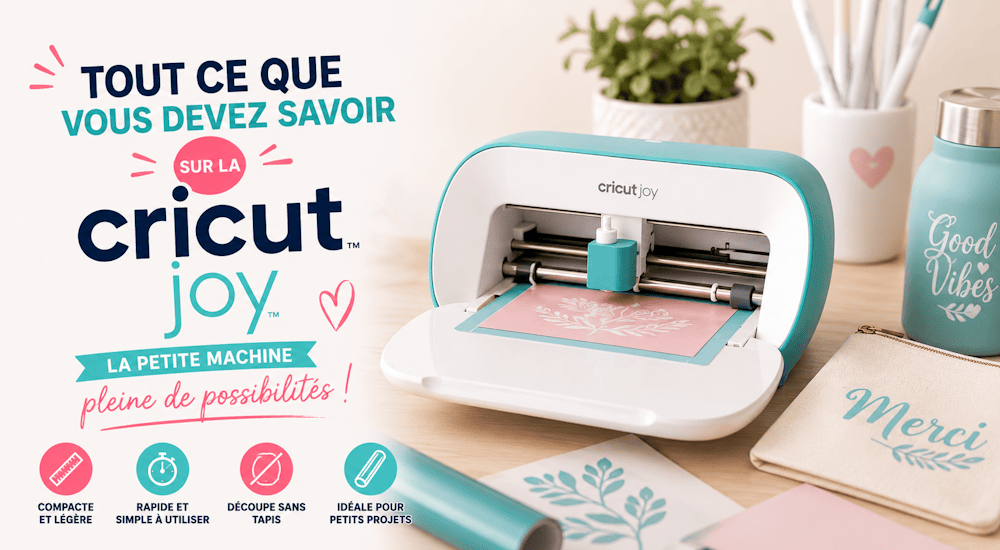
Du musst kein Bastelprofi sein, um die Schneidemaschine Cricut Joy zu lieben. Hast du schon von diesem süßen kleinen Bastelhelfer gehört? Es ist eine kleine elektronische Maschine, die bereit ist, all deine großen kreativen Ideen zu schneiden und umzusetzen. 🤩
Im heutigen Artikel erfährst du alles, was du über die Cricut Joy wissen musst, damit du entscheiden kannst, ob dieses kleine Schmuckstück zu dir passt (oder eben nicht 🤷)!
Was ist die Cricut Joy?
Video generiert von bonega.ai
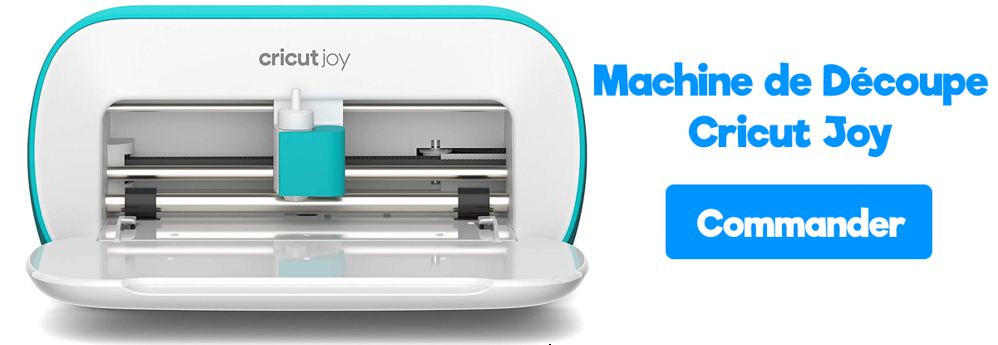
Die Cricut Joy ist eine kleine Schneidemaschine, mit der du verschiedene dünne Materialien schneiden und bemalen kannst, darunter selbstklebende Vinylfolie, Tonkarton, Flexfolie und vieles mehr. Weil sie so klein und einfach zu bedienen ist, kannst du sie in jeden Raum mitnehmen und ganz unkompliziert basteln. 👍
Das ist im Lieferumfang der Cricut Joy enthalten
In der Box findest du:
- Die Schneidemaschine Cricut Joy mit feinem Schneidemesser und Messergehäuse.
- Ein Stromkabel
- Einen schwarzen Stift (0,4 mm).
Messer und Gehäuse sind in der Cricut Joy bereits eingesetzt.
Die Software der Cricut Joy bietet dir außerdem kostenlose Projekte, mit denen du ganz einfach üben kannst. ✅
Die wichtigsten Merkmale der Cricut Joy
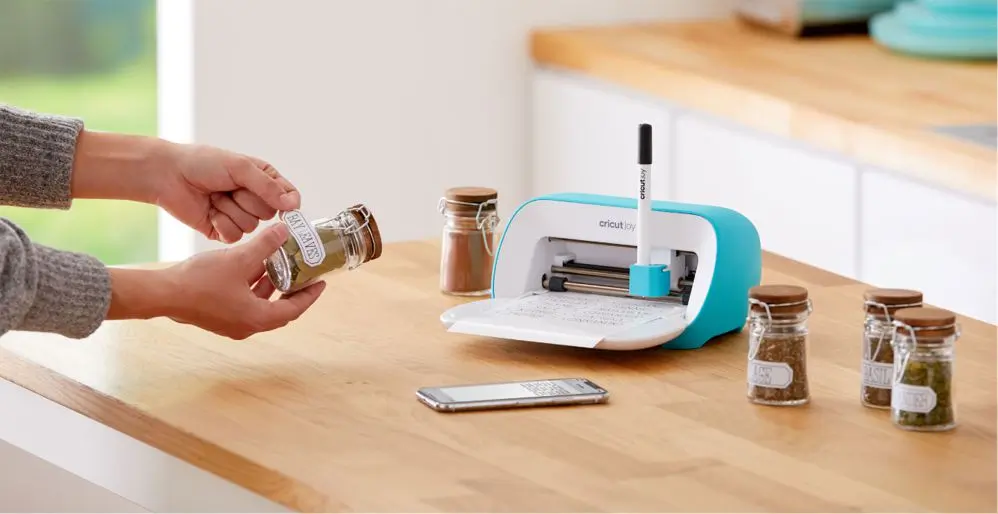
Die Cricut Joy ist die Kleinste unter den Cricut-Schneidemaschinen. Aber lass dich von ihrer Größe nicht täuschen: Diese kleine Maschine kann eine ganze Menge!
Kompakt und tragbar
Wie schon erwähnt, ist die Joy die kleinste Schneidemaschine von Cricut! Du kannst sie in einem Fach verstauen oder auf die Arbeitsplatte stellen. Sie ist also schnell weggeräumt und genauso schnell wieder aufgebaut. Das ist besonders praktisch, wenn du zum Schneiden deiner Motive oft den Raum wechselst.
Da du keine Schneidematte mitnehmen musst und das Zubehör klein ist, bleibt das ganze System schön leicht. Du brauchst keinen eigenen Raum, um deine Ideen umzusetzen.
Keine Schneidematte nötig!
Für die Schneidemaschine Cricut Joy gibt es eine ganze Reihe von Materialien, die ohne Matte geschnitten werden. Das heißt: weniger kaufen, weniger Arbeitsschritte und schnellere Ergebnisse. 😀
Schneidet bis zu 6 Meter lang!
Die Cricut Joy schneidet einzelne Motive bis zu 1,5 m Länge und sich wiederholende Motive bis zu 6 m Länge! Mit der Cricut Joy setzt du Projekte in weniger als 15 Minuten um, ideal für alle, die schnell etwas basteln möchten. ✨
Welche Materialien kann ich mit der Cricut Joy schneiden?
- Flexfolie
- Cardstock
- Selbstklebende Vinylfolie
- Papier
- Infusible-Ink-Transferbögen
- Karton
- Plakatkarton
- Tonkarton
- Glitzerpapier
- Perlmuttpapier
Und noch vieles mehr! 😊
Diese Projekte kannst du mit der Schneidemaschine Cricut Joy umsetzen:
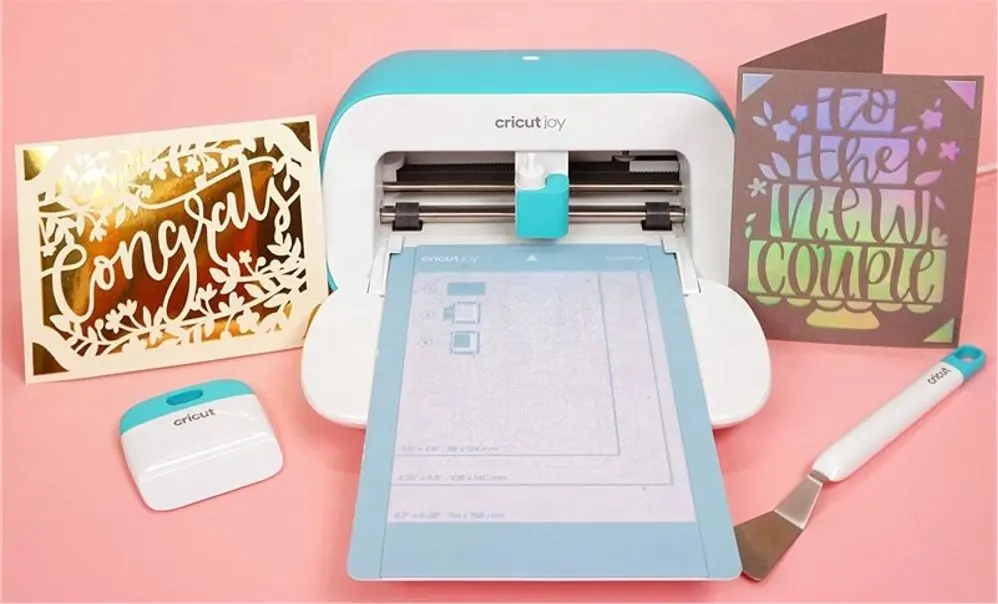
Mit der Cricut Joy kannst du alle möglichen Projekte umsetzen:
- Karten mit ausgeschnittenen oder gezeichneten Motiven
- Einladungen für Feste oder Hochzeiten
- Tischkärtchen für Dinnerpartys oder Hochzeiten
- Etiketten für Gläser, Schubladen oder Brotdosen.
- Logos aus selbstklebender Vinylfolie für Wände, Tassen, Trinkflaschen und alles, was dir sonst noch für die Deko einfällt!
- Logos aus Flexfolie für Kleidung und Textilien
- Partydeko und Wimpelketten
Wie viel kostet die Cricut Joy? 💸
Die Cricut Joy kostet 190 Euro, ein attraktiver Preis für eine Schneidemaschine. Die Cricut Maker, die bekannteste Schneidemaschine von Cricut, liegt dagegen bei etwa 290 Euro.
Brauche ich die Cricut Joy, wenn ich schon einen Plotter habe?
Nein. Wenn du bereits eine Cricut Explore Air oder Maker hast, bringt dir die Schneidemaschine Cricut Joy keine neuen Funktionen für deine Projekte.
Wenn du schon Erfahrung mit Cricut hast und eine oder mehrere Cricut-Maschinen in deinem Bastelzimmer stehen, brauchst du die Cricut Joy nicht.
Trotzdem kann es sich lohnen, die Joy zusätzlich anzuschaffen (auch wenn du schon einen Plotter hast), wenn du eine Maschine suchst, die du leicht mitnehmen kannst, oder eine für einen zweiten Ort.
Für wen ist die Cricut Joy gedacht?
Die Schneidemaschine Cricut Joy hat sicher ihre Grenzen, aber auch ihre Vorteile, allen voran, dass sie tragbar ist! Diese Maschine ist praktisch für Menschen, die viel unterwegs sind, für kleine Bastelecken mit wenig Platz (zum Beispiel im Wohnmobil), für Lehrkräfte, die im Unterricht schnell etwas basteln möchten, für alle, die Karten gestalten, und für Leute, die an Kreativmärkten teilnehmen.
Kurz gesagt: für alle, die wenig Platz haben, eine tragbare Maschine brauchen oder ein ganz bestimmtes Projekt vorhaben. 🙄
Wenn du Karten gestaltest, ist diese kleine Maschine die ideale Begleiterin in deinem Bastelzimmer.
Oder vielleicht bist du gar nicht so kreativ, liebst aber Ordnung ❤️. Dann wäre diese kleine Maschine perfekt im Büro (oder in der Küche!), um bei Bedarf personalisierte Etiketten zu erstellen.
Vor- und Nachteile der Cricut Joy
Wenn du den Artikel bis hierhin gelesen hast, kennst du die Vor- und Nachteile dieser Maschine vielleicht schon.
Fangen wir mit den Vorteilen an:
✔️ Schnelles Schneiden auf vielen verschiedenen Materialien
✔️ Schneidet bis zu 6 Meter lang
✔️ Lässt sich ganz leicht in jeden Raum oder auf Reisen mitnehmen.
✔️ Im Vergleich zu älteren Maschinen sehr einfach zu bedienen.
Und jetzt zu den Nachteilen:
❌ Sie hat keinen USB-Anschluss (falls du kein Bluetooth-fähiges Gerät hast).
❌ Die Projektbreite ist begrenzt: nur 12 cm
❌ Sie kann keine zu dicken und harten Materialien wie Holz schneiden, dafür bräuchtest du eine Cricut Maker
Wie benutzt man die Cricut Joy?
Die Schneidemaschine Cricut Joy funktioniert mit der Software Cricut Design Space. Installiere also zuerst diese Software, bevor du mit deinen Projekten loslegst 😉
In diesem Beispiel gehen wir davon aus, dass wir selbstklebende Vinylfolie schneiden.
Öffne zuerst ein neues Projekt in Cricut Design Space auf deinem Handy oder Computer. Wenn du einen Text schneiden möchtest, klicke in der linken Seitenleiste auf das Werkzeug „Text“, um ein Textfeld zu öffnen.
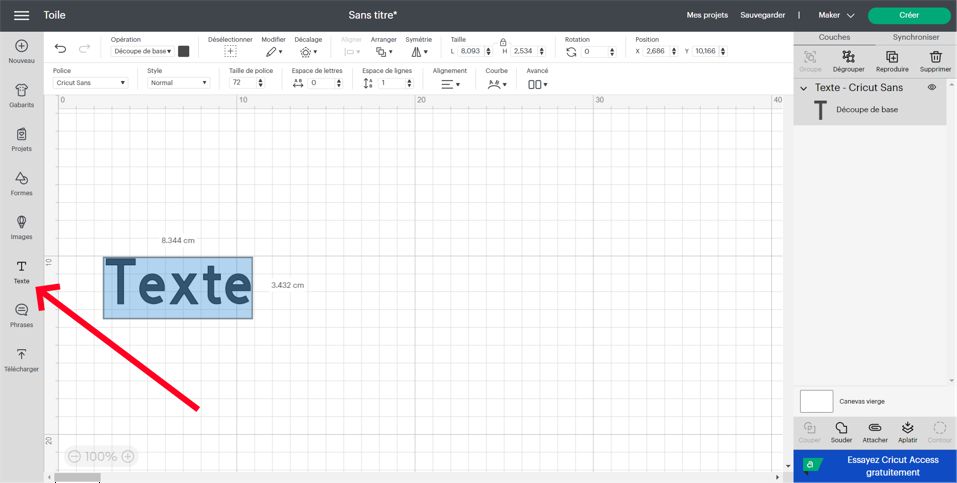
Gib den gewünschten Text ein. Solange der Text noch ausgewählt ist, kannst du die Schriftart ändern.
Du kannst auch ein selbst gestaltetes Motiv hochladen, indem du in der Seitenleiste auf „Hochladen“ klickst. Passe die Größe an, indem du die Schriftgröße änderst oder an den Ecken des Motivs ziehst.
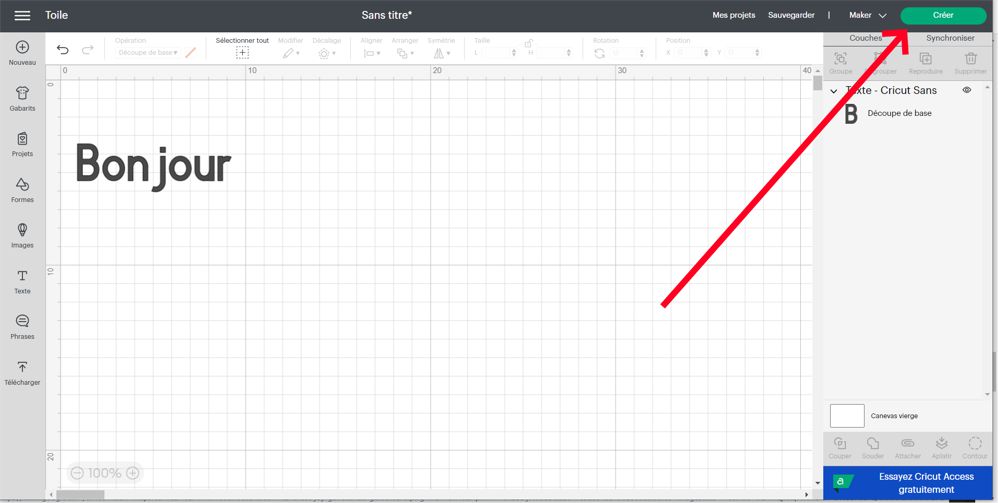
Wenn alles passt, klicke auf „Erstellen“! 👈
Um deine Vinylfolie in die Maschine einzulegen, brauchst du keine Schneidematte! Schieb sie einfach unter die Klemmen auf beiden Seiten des Einzugs, sobald der Bildschirm dich dazu auffordert.
Die Maschine erkennt, dass du die Folie eingelegt hast, und zieht sie in die richtige Position.
Jetzt, wo dein Motiv fertig ist und die Vinylfolie eingelegt ist, geht es mit diesen Schritten weiter, um dein Projekt zu schneiden und aufzubringen:
1️⃣ Sobald die Vinylfolie eingelegt ist, aktiviert Design Space unten rechts auf dem Bildschirm die Schaltfläche Go. Drück darauf und lass die Cricut Joy ihre Magie wirken! Wenn der Schnitt fertig ist, gibt die Maschine die Folie von selbst wieder aus, du musst nichts weiter tun.
2️⃣ Schneide die Vinylfolie mit einer Schere rund um dein Motiv zurecht. Entferne dann die überschüssige Folie: Fang an einer Ecke an und zieh sie nach hinten ab, damit dein Motiv zum Vorschein kommt.
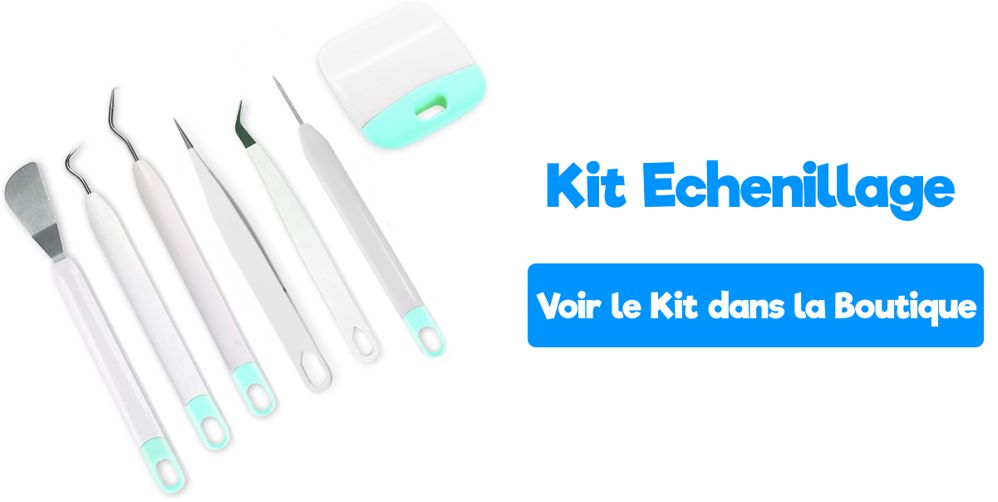
3️⃣ Mit unserem Entgittern-Set kannst du alle restlichen Folienreste entfernen. Das Innere der Buchstaben lässt sich ohne Entgitterhaken oder spezielle Pinzette nur schwer entgittern.
4️⃣ Schneide ein Stück Transferfolie zu, das etwas größer ist als dein Motiv. Damit überträgst du dein Etikett in einem Stück auf deinen Behälter.
5️⃣ Zieh das Trägerpapier der Transferfolie ab, sodass nur die durchsichtige, klebende Folie mit Raster übrig bleibt. Lege die Transferfolie auf dein Motiv und reibe darüber, damit die Buchstaben oder das Motiv gut daran haften.
6️⃣ Zieh die Transferfolie nach oben ab. Dabei sollte das Motiv an ihr haften bleiben und nur das weiße Trägerpapier zurückbleiben.
7️⃣ Drücke deinen neuen Sticker auf die Oberfläche deiner Wahl, reibe über das Motiv und ziehe dann die Transferfolie ab, sodass nur das Motiv übrig bleibt.
Und schon bist du fertig!
Wir hoffen, dieses Tutorial hat dir bei der Entscheidung geholfen, ob sich eine Cricut Joy für dich lohnt oder nicht!
Unser Unternehmen ist auf den Verkauf von Flexfolie und selbstklebender Vinylfolie spezialisiert. Diese Materialien sind bei allen beliebt, die einen Plotter besitzen (ob Cricut Joy oder ein anderes Modell)
- Mit Flexfolie überträgst du Motive auf Textilien (T-Shirts, Sweatshirts, Kissen)
- Mit selbstklebender Vinylfolie bringst du Motive auf feste Oberflächen (Möbel, Schreibtische, Fenster)
Bestell unsere Flexfolien und Vinylfolien jetzt im Onlineshop von Transfer Paper! ⤵️
Kommentare
Noch keine Kommentare. Schreib den ersten und teile deine Erfahrung.
Kommentar schreiben